0%

前言

因為最近RIR(Rhino Inside Revit)的整合技術陸續Mcneel官方慢慢釋出相關的document跟陸續有點資料大家在討論,想整理一下目前的資料,以及剛聽完hiron對RhinoInside的簡介,想寫一下部分的筆記,也不確定可以寫多少,讀者加減把這篇看成入門的練習吧,如果有甚麼不詳盡的部分還請利用下方留言板跟我討論一下,謝謝~

What is Rhino.Inside

Rhino.Inside is a new technology developed by Robert McNeel & Associates that allows embedding Rhino WIP into other applications. Rhino.Inside is being embedded into many applications from a wide variety of disciplines.

Rhino.Inside.Revit

Rhino.Inside.Revit is an addon for Autodesk Revit that allows Rhino WIP to be loaded into the memory of Revit just like other Revit addons.

2020年5月的進度

如果大家點開RiR_github然後可以發現McNeel官方在.NET framework下實踐了把Rhino塞到各個平台上。
大概的操作狀況可以參考hironのblog, 我自己嘗試了在autocad軟體上成功執行TestRhinoInside了。

Rhino.Inside

  • Rhino.Inside illastrator
  • Rhino.Inside AutoCAD
  • Rhino.Inside Revit
  • Rhino.Inside BricsCAD
  • Rhino.Inside ConsoleApp
  • Rhino.Inside DotNet
  • Rhino.Inside JavaScript
  • Rhino.Inside UE
  • Rhino.Inside Excel
  • Rhino.Inside Unity

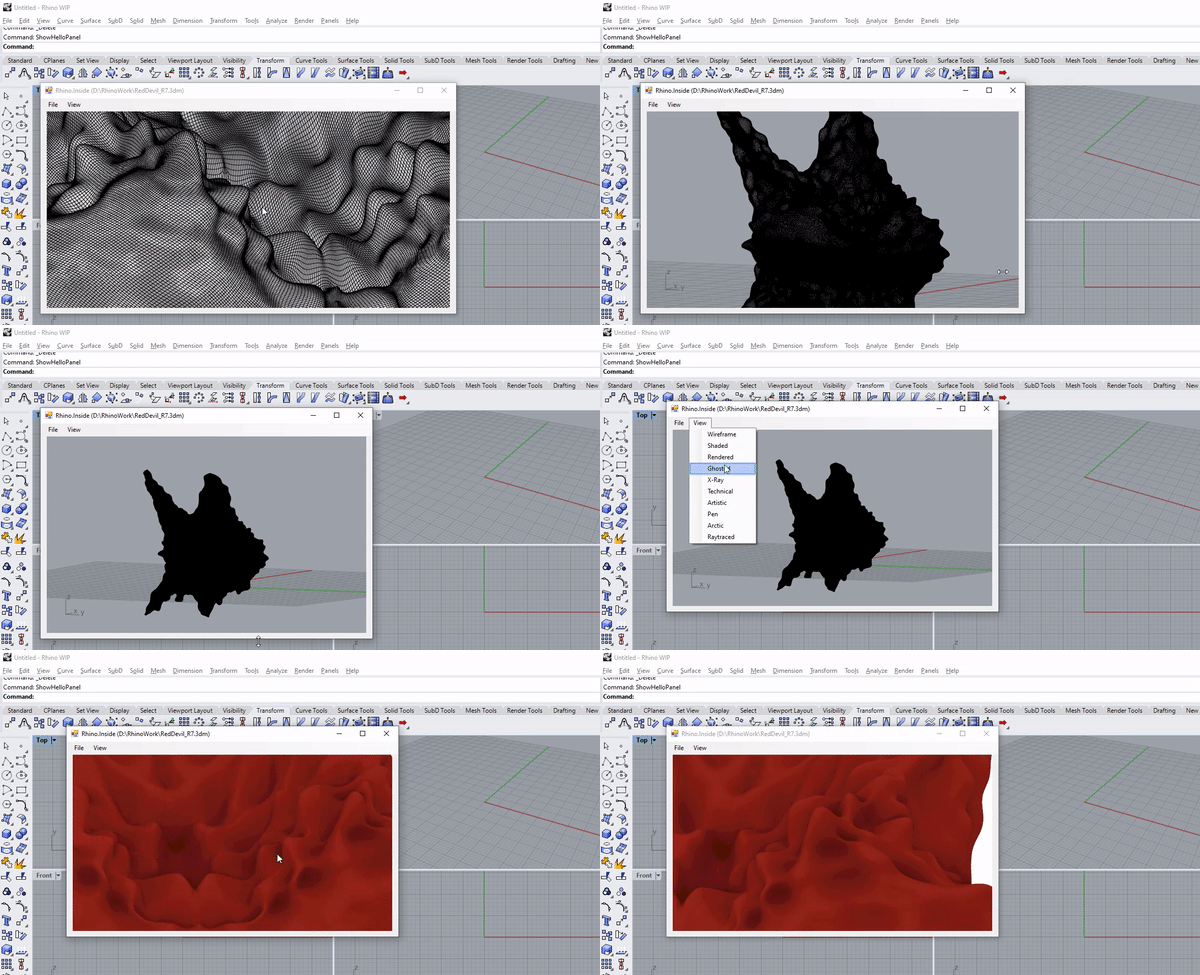
稍微嘗試了一下Rhino.Inside DotNet,拿了以前的模型丟進WinForms的小視窗。如果有用過WPF或是WinForms的話,大概可以知道做出一個pop up windows的感覺,Revit API也常常會遇到要設計給使用者輸入資訊的情況。
大概會像這樣
Node

不過也有發現現在功能相對不穩定,不一定一開就可以成功,可能開發團隊還在努力吧。

Sender&Receiver

這部份透過hiron的講解,大概讓我們知道Rhino.Inside的實作方式。因為還沒很深入去看底層的東西(一部分應該目前看也看不懂)就紀錄一下我的猜測,因為Rhino.Inside是把整個Rhino當作子程式掛件掛在其他程式上,如果用Rhino.Inside的時候開檔案管理員,應該會發現程式占用的記憶體會飆高。 但因為是在同一個主程式下的記憶體中運算,所以如果能做成一個通道把Rhino運算的東西傳給其他程式(傳回主程式),或讀取主程式的資料的話。Rhino.Inside 任何程式都可以看成是資料寫出跟寫入的過程。其實大方向很簡單的來說就是省去了存檔再讀取的步驟,但因為寫出往往是寫到硬碟,又到硬碟讀會讓流程整個變慢,更別說是想要Real Time修改東西了。

Implement in Grasshopper

hiron介紹了一段code如下:
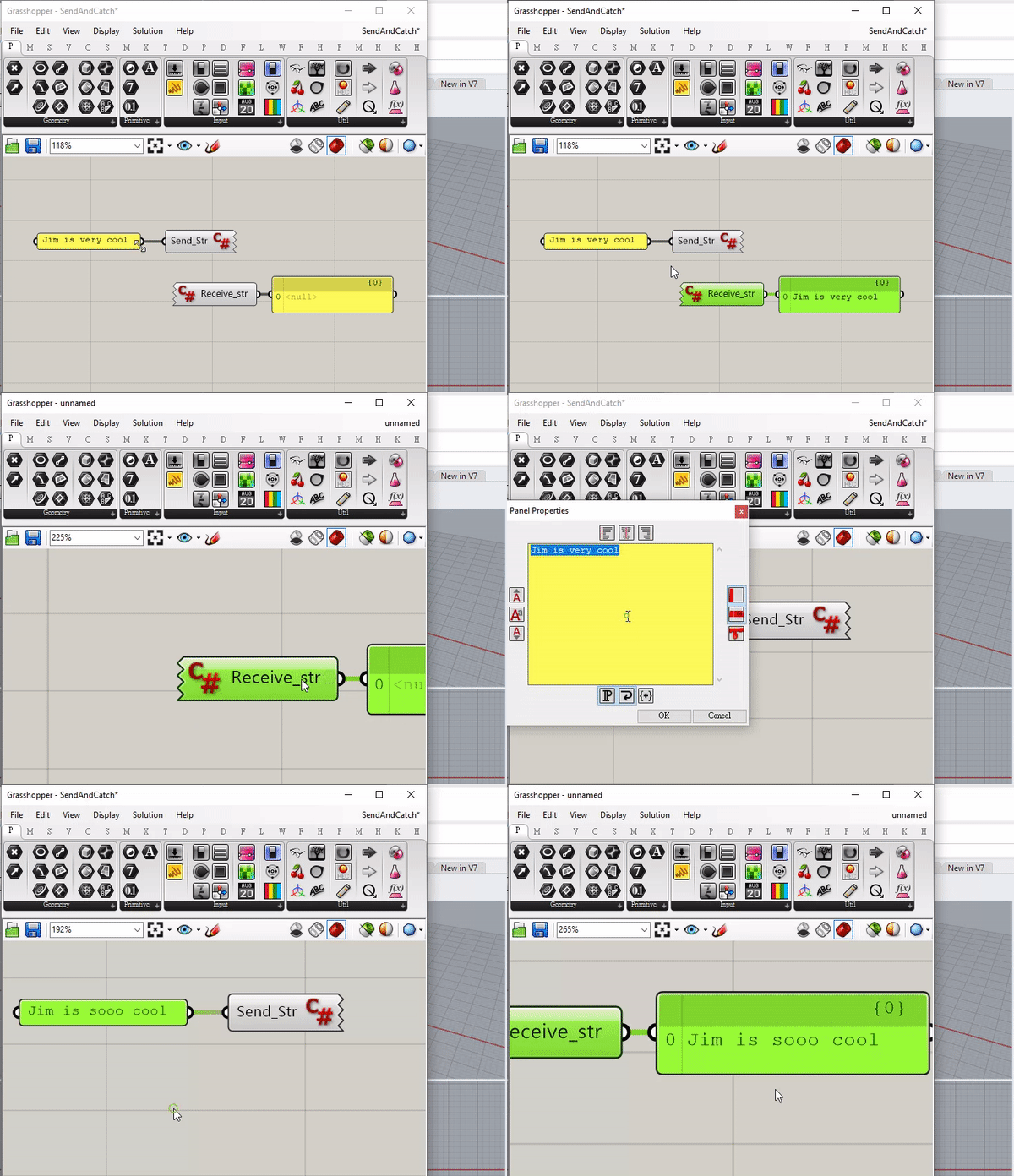
Node

Sender

1
2
3
4
5
6
7
8
private void RunScript(string Send_Str)
{
using(var args = new Rhino.Runtime.NamedParametersEventArgs()){
args.Set("str", Send_Str);
Rhino.Runtime.HostUtils.ExecuteNamedCallback("ToRiR", args);
}
}

Receiver

1
2
3
4
5
6
7
8
9
10
11
12
13
14
15
16
17
18
19
20
21
22
23
24
25
private void RunScript(ref object Receive_str)
{
Receive(Component);
Receive_str = str;
}

//
string str;
bool registered = false;
IGH_Component comp = null;

void Receive(IGH_Component component){
if(!registered){
Rhino.Runtime.HostUtils.RegisterNamedCallback("ToRiR", RiRhino);
comp = component;
registered = true;
}
}
void RiRhino(object sender, Rhino.Runtime.NamedParametersEventArgs args){
string values;
if(args.TryGetString("str", out values)){
str = values;
}
comp.ExpireSolution(true);
}

因為其實C# Component中 Member縮排那邊有先定義過一個private readonly IGH_Component Component; ,所以在上面的RunScript可以直接用。

Runtime.HostUtils.ExecuteNamedCallback

Execute a named callback

NamedParametersEventArgs

Dictionary style class used for named callback from c++ -> .NET

Runtime.HostUtils.RegisterNamedCallback()

Register a named callback from C++ -> .NET

參考資料

前言

因為想好好寫一下分享文,也整理一下自己的筆記所以弄了這個簡單的 Github Page 如果有甚麼建議還請利用下面的gitalk留言回覆,謝謝~

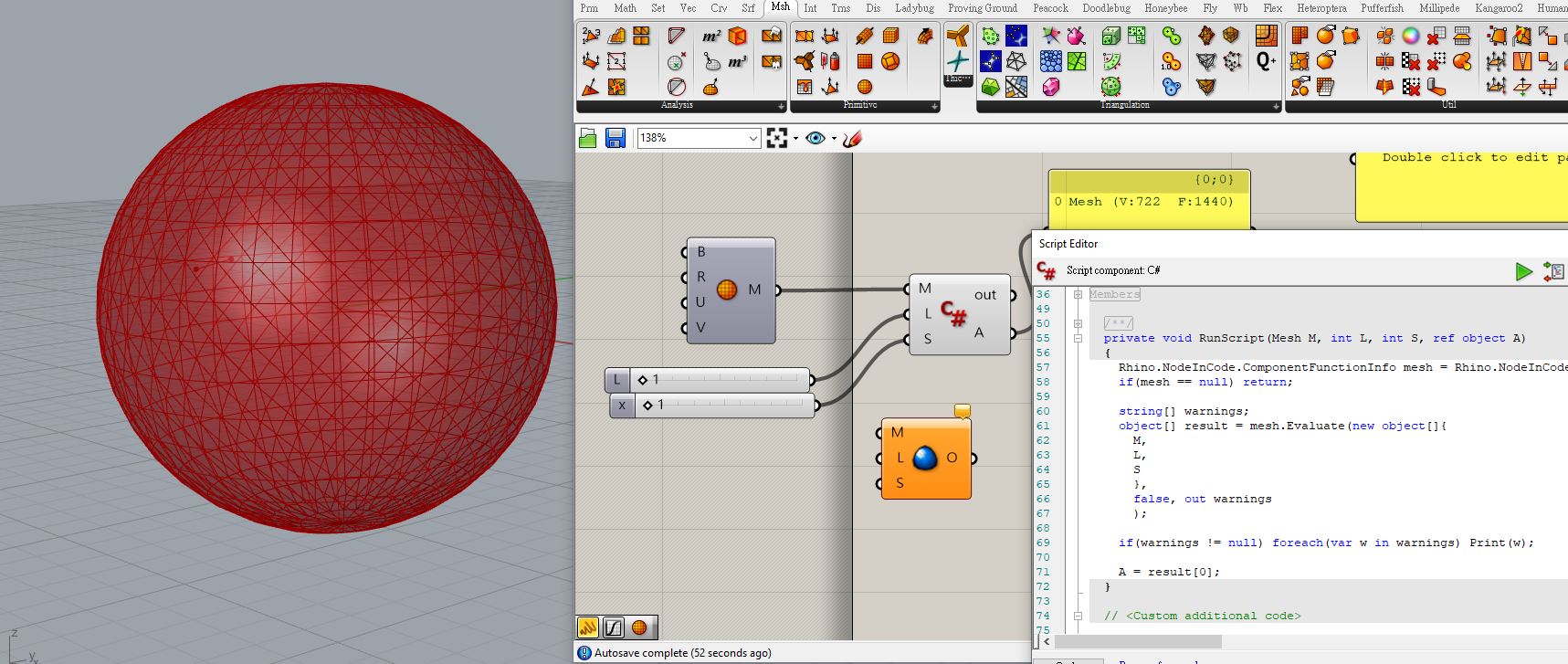
這篇NodeInCode主要是想跟大家分享NodeInCode namespace。看論壇討論串也是2017年初出來的功能,我的理解是,如果在scripting(C#/python/VB)的時候,又想用其他component的功能就很方便。
例如,想要用weaverbirds的Loop_Subd就不用要把自己的C# code因為用不到第三方的component而切成兩個或以上,對資料的整理我覺得會有更好的自由度。

這是我找到的第一次大家討論這個namespace的反應。
Rhino.NodeInCode namespace?
很好笑的是樓主說:

Not sure if this is a dream…

哈哈哈我很能理解~

如何使用?

實際的操作我是跟著這篇,所以如果有不太懂的部分,可以仔細追一下這篇文。

1. 先確定要使用的component名稱

Component的全名我覺得不太直觀能找到,所以可以使用以下方是條列全部loaded components

1
A = Rhino.NodeInCode.Components.NodeInCodeFunctions.GetDynamicMemberNames();

2. 輸入參數

1
2
3
4
5
6
7
8
9
10
11
12
13
14
15
16
17
18
private void RunScript(Mesh M, int L, int S, ref object A)
{
Rhino.NodeInCode.ComponentFunctionInfo mesh = Rhino.NodeInCode.Components.FindComponent("WeaverBird_WeaverbirdsLoopSubdivision");
if(mesh == null) return;

string[] warnings;
object[] result = mesh.Evaluate(new object[]{
M,
L,
S
},
false, out warnings
);

if(warnings != null) foreach(var w in warnings) Print(w);

A = result[0];
}

Node

當然有些list或DataTree的結構這邊也可以做。
透過這個方式可以重新包裝第三方的Component但因為Grasshopper基本上都是開源的,不要因為這樣就重新包裝別人的code說是自己的,要給設計方credit,這很重要。
之前有發生過pufferfish的component被包進另一個panda component的事件,很不好啦。

後記

之前哈佛的建築系教授garciadelcastillo 做了一個project GH#就是想做個documentation幫助從grasshopper介面轉到C#的過程。
很多時候不一定邏輯想不通,而是不確定可以用的工具有哪些。garciadelcastillo也提過說基本上RhinoCommon的document跟grasshopper的default component應該可以找到一對一對應的(我實際上覺得C#的自由度更大),
但有些輸入的parameters跟細微的定義會依照programmer的sense而有些微的不同。

另外最近我自己對RTree跟kangaroo的結合很感興趣,也發現也發現有這方面的研究
感覺是一個CITA的教授的projectRTree+Kangaroo
Petras Vestartas
雖然沒有實際看過他這個模擬的code但因為他是用kangaroo結合RTree所以應該也是用這樣NodeInCode的方式

因為之前做了Fuji Pavilion 1970 Expo用了kangaroo做這種模擬,但發現接觸點太多會讓計算變得很慢,所以有Rtree的幫忙應該會快很多。
其實目前覺得最快的應該是用FlexHopper(from Benjamin Felbrich) 因為FlexHopper用Nvidia Flex CLI作,用GPU會快很多,再加RTree那應該可以真的很快。

RTree